MCP Access
One agent for authors, another for readers
PolicyCo connects agents to your policy program through the Model Context Protocol, and MCP has two sides. Producers use an agent to craft language and track overlapping concepts, with PolicyCo as its long-term memory and guardrails. Consumers get a read-only Viewer agent that helps them find answers. Every MCP interaction fully respects user roles and permissions.
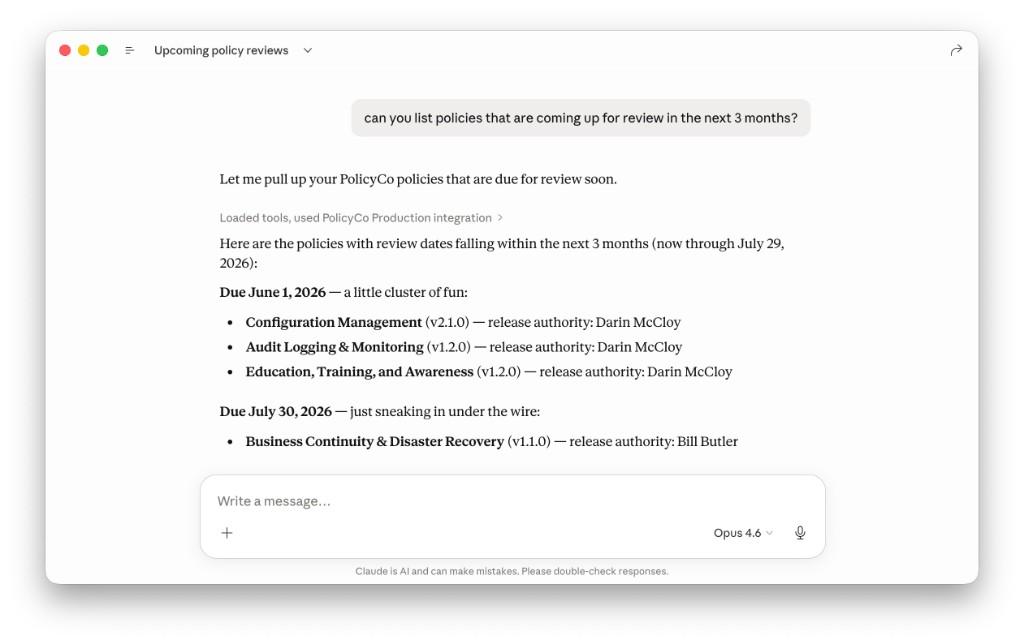
Your PolicyCo structure becomes the long-term memory and guardrails for your authoring agent, while consumers get a read-only Viewer agent. Roles and permissions are respected on both sides.
Two sides of MCP
The people who write your policies and the people who follow them need different things from an agent. PolicyCo gives each side the right one.
Your agent, with PolicyCo as its memory and guardrails
Connect an agent such as Claude to PolicyCo and it works from the structure you have already built, instead of starting from a blank page. Your articles, policies, procedures, controls, and the links between them become its long-term memory.
Craft language
Draft and refine wording that fits what your documentation already says, in the voice and structure your program uses.
Track overlapping concepts
Spot repeated language, overlapping concepts, and inconsistencies that are hard to see when you review documents one at a time.
Long-term memory and guardrails
PolicyCo structure keeps the agent anchored to your real program, so its suggestions stay inside the lines you have drawn.
Populate records from your sources
Eligible roles can write as well as read, for example filling in Third Parties from email, spreadsheets, or lists.
The Viewer agent, read-only by design
Consumers get a helper in the Viewer that answers questions about the policies and procedures they have access to. Their access is limited to read-only, so they can find and understand guidance without any way to change a record.
Read-only access
Consumers can look things up and ask questions. They cannot create, edit, or change anything.
Plain-language answers
Ask the way you would ask a coworker and get an answer grounded in your documentation.
Only what you can see
Answers draw on documents the person already has permission to open, and nothing else.
Roles and permissions always apply
On both sides, MCP interactions fully respect user roles and permissions. Access follows the person using the agent, so write is available to eligible roles only and consumers stay read-only.
Ask agents to explain how policies, procedures, controls, and evidence connect across your compliance program.
Use plain-language questions instead of exports, filters, or manual lookups when you need fast context.
MCP is on by default, so there is nothing to enable. Each user copies a personal MCP Access URL from Settings → Personal Profile → MCP Access, adds it as a custom connector in Claude, and approves the connection through a PolicyCo sign-in redirect. The URL is personal to each user, its ID scopes it to a specific organization, and it is only visible inside the platform.
Search and read policies, procedures, and articles; list tasks, bookmarks, and upcoming reviews; create a new policy. If the user allows drafts, agents can also save draft changes to articles and procedures and submit them for review.
When connecting, the user chooses read-only access, or read plus the ability to save drafts. Roles and permissions apply on top of whichever scope is granted.
Included on every plan. PolicyCo has no feature tiers.
See MCP Access in action
Book an overview call to explore how PolicyCo can help your organization.